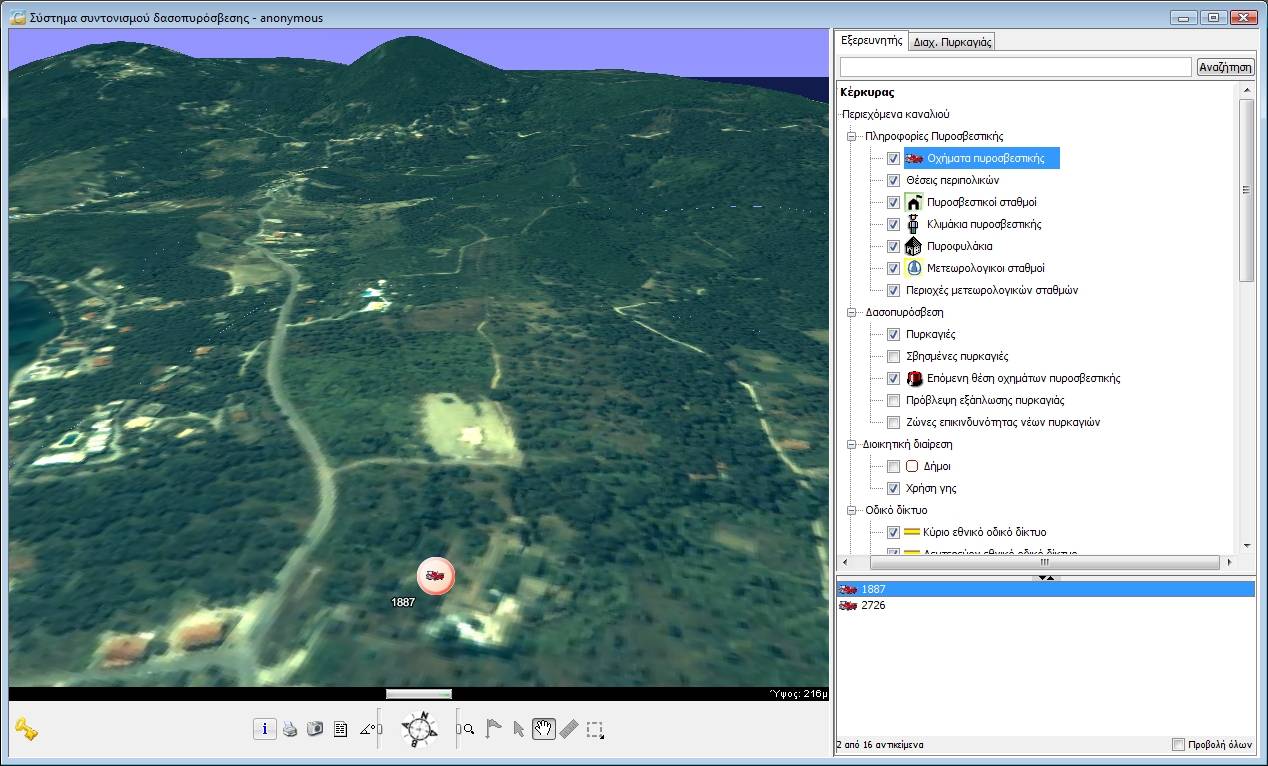
3D navigation over Corfu and selective display of information
The users of the system have at their disposal tools that allow:
Easy navigation to any area in a two-dimensional or three-dimensional geographic background
in various ways, such as the use of buttons and switches, using the mouse, as well as the keyboard.
Displaying position and height information for all points on the map, as well as for all objects on it.
Locating objects on the map or in space (vehicles, fire watch stations, hydrants, etc.).
Selecting objects of the map and examining their properties (e.g., the values of measurements
collected by meteorological sensors).
Incorporating new content. Users can create and attach personal objects on the maps, accompanied by
descriptive information (e.g., flags-message marks, fire fronts, vehicle routes, etc.).
Criteria-based search and filtering of information. Users can search selectively,
based on lexicographical characteristics (name of town, area, vehicle, object, etc.),
spatial criteria specified graphically on the map (distance from a point, containment in an area, etc.)
and in combination. The display of the points of interest, such as the various categories of geographic
features, can be adjusted using spatial or descriptive filters that the users can apply in real time.
Thus, for example, a user can limit the display on screen of the entire set of points, where water
can be obtained, to a subset contained in a circle of a specific radius from the center of a fire.
Then, by moving the spatial filter that was just defined over another center of the fire,
he can isolate the subset of points where water is available that satisfies the particular condition
for the current center.
Measuring distances.
Obtaining on-line help for all the tools of the environment.